接入指南 接入指南
  • V2 (opens new window)
  • V3 (opens new window)
  • V4-English (opens new window)
  • 接入指南
    • 接入准备
    • 快速启动
    • 开发指南
    • 接入方式
    • 工具
    • 附录
    • 术语
  • API文档
    • checkout
    • dispute
    • Tokenization
    • 异步通知
    • Marketplaces
    • Terminal integration API
  • Marketplaces
  • Accept in-person payments with Terminal
  • 覆盖国家
  • 风险管理
  • 对账服务
  • 支付方式
  • V2 (opens new window)
  • V3 (opens new window)
  • V4-English (opens new window)
  • v4

FunPinPin&PingPongCheckout配置

# FunPinPin&PingPongCheckout配置

绑定路径:【店铺管理后台】-【设置】-【收款设置】- 【信用卡收款】选择PingPong 支付
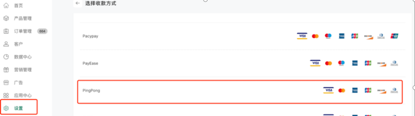
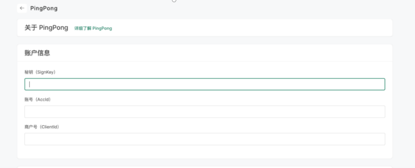
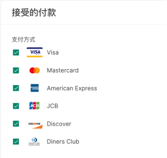
选择PingPong 支付后,进入绑定页面,填入对应账号信息,选择支持的信用卡,点右下角激活按钮,即可激活成功。
上次更新: 2023/11/20, 14:33:07
杭州乒乓智能技术有限公司 | Copyright © 2015-2026 checkout.pingpongx.com.All Rights Reserved.
  • 浅色模式